
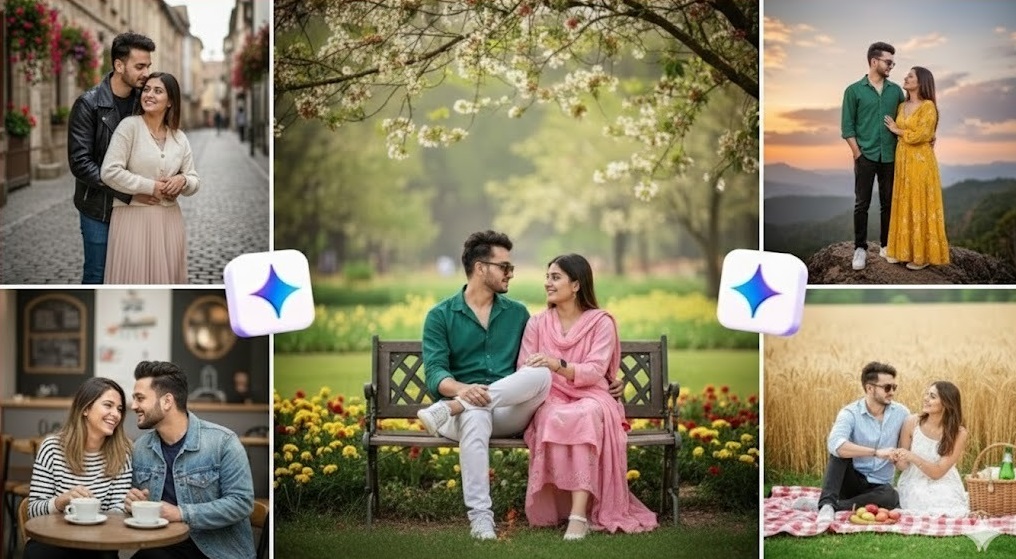
Wedding photos, family portraits, and sibling’s pictures are all about emotion: love, connection, nostalgia, and small real-life moments. When you use Gemini AI for these kinds of images—whether to create new visuals, plan shot ideas, or mock up concepts for clients—the quality of your prompt decides how real and heartfelt the result feels.
A simple line like “wedding photo of a couple” usually gives you something generic. But when you describe the pose, lighting, relationship, outfits, and mood clearly, Gemini can create images that look like they came from a real photographer’s camera: warm, intimate, and full of story.
This guide gives you Gemini AI prompts for wedding photos, family photos, and siblings portraits, grouped so you can quickly find the style you need: romantic couple shots, candid moments, full family scenes, cozy home images, and playful sibling’s photos. You can use them to generate AI images, brainstorm ideas for real photoshoots, or design mood boards and sample albums—just copy, paste, and customize the details in brackets to match your vision.
How to Write Effective Family & Wedding Photo Prompts
Family and wedding photos rely heavily on emotion, relationships, and natural-looking details. When prompting Gemini, your goal is to help the model understand not just what to show, but how it should feel. The more clearly you describe the moment, the more authentic and heart-touching the final image will be.
1. Focus on Emotion and Connection
Family images are built on emotion—love, laughter, intimacy, joy, or nostalgia. Add emotional cues directly in the prompt:
- “warm, emotional moment”
- “playful siblings laughing together”
- “romantic newlyweds holding hands with soft smiles”
These phrases guide Gemini to create images with natural expressions and chemistry.
2. Describe Pose, Setting, and Mood Clearly
Family and wedding images often look best when the pose is intentional:
- “bride resting her head on the groom’s shoulder”
- “parents sitting with children in their laps”
- “siblings holding hands while walking through a park”
Add setting details (garden, beach, living room, ceremony venue) and mood (bright, cozy, soft, romantic).
3. Add Outfits and Styling Details
Clothing influences the tone of the photo:
- wedding gowns, sherwani, tuxedo
- pastel dresses for family shoots
- matching outfits for siblings
Mentioning style ensures consistency and realism.
4. Use Tone Words for Atmosphere
Words like warm, soft, candid, elegant, dreamy, cozy instantly shape the aesthetic.
For example:
“Candid moment with soft golden-hour light.”
5. Weak Prompt vs Strong Prompt
Weak:
“Wedding couple photo.”
Strong:
“Romantic wedding portrait of a bride and groom standing in a garden at sunset, soft golden-hour lighting, bride holding bouquet, groom smiling gently, warm emotional mood, cinematic and realistic style.”
Clear structure = better, more emotional images.
Use this approach throughout your prompts, and Gemini will consistently deliver natural, relatable, real-feeling family and wedding visuals.
Wedding Photo Prompts (20 Prompts)
These wedding prompts are crafted to capture romance, emotion, elegance, and natural storytelling. Each one is detailed so Gemini understands the pose, setting, lighting, and mood. Customize anything in brackets.
Romantic Couple Portraits (5 Prompts)
- Sunset garden portrait
Create a romantic portrait of a bride and groom standing in a flower garden at sunset. Soft golden-hour lighting, warm colors, bride holding a bouquet, groom’s arm around her waist, gentle smiles, cinematic and dreamy mood.
- Beachside couple shot
Generate a wedding photo of a couple walking barefoot along the beach, waves touching their feet, pastel sky, soft breeze in the bride’s veil, candid moment with natural laughter.
- Close-up emotional moment
Create a close-up photo of the couple gently touching foreheads, eyes closed, soft backlight, warm tones, wedding attire in focus, emotional and intimate feel.
- Elegant indoor portrait
Generate an indoor wedding portrait in a beautifully decorated hall with chandeliers, couple standing close, soft diffused lighting, elegant and timeless atmosphere.
- Cinematic hilltop shot
Create a dramatic wide shot of newlyweds standing on a hilltop with wind blowing the bride’s dress, cloudy sky, sunlight breaking through, epic cinematic mood.

Candid Wedding Moments (5 Prompts)
- First look moment
Generate a candid photo of the groom turning around and seeing the bride for the first time, emotional reaction, natural expressions, warm soft lighting, outdoor setting.
- Bride and groom laughing together
Create a candid moment of the couple laughing together during the ceremony, soft background blur, wedding guests slightly visible, joyful and authentic mood.
- First dance
Generate a romantic photo of the couple sharing their first dance, dim warm venue lights, fairy lights in background, bride’s dress slightly twirling.
- Walking down the aisle
Create a candid photo of the bride walking down the aisle with her father, bouquet in hand, emotional expressions, church interior with warm natural light.
- Celebration confetti
Generate a joyful shot of the couple walking through a crowd while guests throw flower petals or confetti, bright lighting, happy smiles, dynamic motion.
Bridal & Groom Solo Portraits (5 Prompts)
- Bridal close-up beauty shot
Create a close-up portrait of the bride with soft makeup, detailed jewelry, flowing veil, soft window light, elegant and radiant facial expression.
- Bridal full-body elegance
Generate a full-body photo of the bride in her wedding gown, standing near a large window, natural light highlighting the dress details, minimal background.
- Groom’s classic portrait
Create a formal portrait of the groom in a tuxedo or sherwani, standing confidently, dark elegant background, soft studio lighting, sharp and clean details.
- Groom adjusting attire
Generate a candid shot of the groom adjusting his tie or cufflinks, moody lighting, shallow depth of field, stylish and natural feel.
- Bridal bouquet artistry
Create a detailed close-up of the bride’s hands holding an elegant bouquet, soft background, pastel tones, artistic and refined composition.
Ceremony & Venue-Focused Prompts (5 Prompts)
- Vow exchange moment
Generate a heartfelt moment of the couple exchanging vows, hands gently touching, outdoor ceremony with simple floral decorations, warm daylight.
- Wedding stage portrait
Create a portrait of the couple sitting on a beautifully decorated wedding stage Asian/Westernstyle, soft lighting, luxurious backdrop, elegant traditional attire.
- Church ceremony scene
Generate a wide-angle shot inside a church during the ceremony, couple standing at the altar, stained-glass windows glowing, serene atmosphere.
- Reception table decor
Create a wedding reception table setup with candles, floral centerpieces, soft golden lights, elegant dinnerware, and a warm romantic mood.
- Venue exterior shot
Generate an outdoor photo of the wedding venue decorated with fairy lights, evening sky, guests arriving, and a festive, welcoming ambiance.
These 20 prompts capture everything from emotional close-ups to grand ceremony visuals—perfect for generating stunning AI wedding concept images or storytelling scenes with Gemini.
Family Photo Prompts (20 Prompts)
These prompts help Gemini generate warm, emotional, and natural-looking family portraits. Each prompt is detailed so the AI understands the relationships, setting, lighting, and mood. Customize anything in brackets.
Parents & Children Portraits (5 Prompts)
- Cozy living room portrait
Create a warm family portrait of parents sitting on a sofa with their child on their laps, soft indoor lighting, neutral-toned living room, genuine smiles, cozy and natural mood.
- Mother and child candid moment
Generate a candid photo of a mother holding her toddler in her arms, both laughing, sunlight coming through a window, soft blur in the background.
- Father and daughter bonding
Create an outdoor photo of a father holding his daughter’s hand while walking in a park, golden-hour lighting, and trees in the background, playful and emotional atmosphere.
- Parents reading to child
Generate a warm indoor moment of parents reading a storybook to their child in bed, soft yellow lamp light, cozy blankets, and peaceful family scene.
- Family cuddling photo
Create a close-up portrait of parents hugging their child tightly, bright natural daylight, soft colors, emotional and heartwarming vibe.
Whole Family Group Photos (5 Prompts)
- Outdoor family portrait
Generate a full-family portrait in a garden or park setting, everyone wearing coordinated pastel outfits, bright natural lighting, and clean composition.
- Studio family photo
Create a formal studio-style family portrait with seamless background, soft professional lighting, and parents standing behind seated children, balanced and classic arrangement.
- Large extended family photo
Generate a group photo of an extended family 8–12members, arranged in layers, warm smiles, outdoor sunlight, cheerful and celebratory atmosphere.
- Sitting on picnic blanket
Create an outdoor family photo of parents and kids sitting together on a picnic blanket with snacks, green trees around, playful and casual mood.
- Family walking hand-in-hand
Generate a candid shot of a family walking hand-in-hand along a path, backlit by warm sunset, long soft shadows, peaceful and cinematic feel.
Lifestyle & Candid Home Moments (5 Prompts)
- Baking together in the kitchen
Create a candid family moment of parents and kids baking cookies in a bright kitchen, flour dust in the air, warm lighting, joyful expressions.
- Morning routine moment
Generate a cozy indoor photo of a family having breakfast at the dining table, soft morning sunlight, natural unposed expressions.
- Playing on living room floor
Create a playful scene of kids playing with toys on the floor while parents sit nearby laughing, bright and relaxed home environment.
- Family watching a movie
Generate a warm, intimate evening photo of the family sitting on a couch under blankets watching a movie, dim lamp light and soft shadows.
- Decorating for a holiday
Create a festive family photo of parents and kids decorating a holiday tree or hanging lights, warm glowing lights, joyful mood.
Family Celebrations & Festive Shoots (5 Prompts)
- Birthday celebration
Generate a birthday scene with a child blowing out candles on a cake, parents clapping, colorful decorations, bright cheerful atmosphere.
- Cultural celebration
Create a family portrait wearing traditional culturalattire, standing in a beautifully decorated room, warm lighting, elegant and respectful tone.
- Holiday card photo
Generate a winter holiday family portrait in coordinated outfits, soft fake snow in background, warm smiles, cozy and festive mood.
- Family reunion moment
Create a candid photo capturing a family reunion hug, outdoor setting, golden-hour lighting, emotional and heartwarming expression.
- Newborn with family
Generate a soft, intimate photo of parents holding their newborn in a softly lit bedroom, white blankets, gentle smiles, peaceful and tender atmosphere.
These 20 detailed prompts help you create realistic, cozy, emotional family photos—perfect for AI generation, concept boards, or planning real photoshoots.
Bonus: How to Make Portraits Look More Natural in Gemini
Realistic family, wedding, and siblings portraits rely on subtle details—soft expressions, relaxed poses, clean lighting, and natural imperfections. Gemini can produce beautiful results, but a few smart adjustments can make your portraits look far more authentic.
1. Use Softer, Real-Life Lighting
Natural light creates the most believable photos. Add instructions like:
- “soft window light”
- “warm golden-hour lighting”
- “gentle diffused daylight”
Avoid overly dramatic lighting unless you want a cinematic effect.
2. Add Small Imperfections
Real images aren’t flawless. Mention natural details such as:
- slightly messy hair
- soft wrinkles in clothing
- light motion blur
- natural skin texture
These cues help Gemini avoid overly airbrushed, “AI-perfect” results.
3. Focus on Relationships, Not Just Poses
Family and wedding portraits feel real when there’s visible connection. Add prompts like:
- “genuine smile”
- “natural laughter”
- “warm emotional moment”
- “parents looking at their child lovingly”
This makes the image feel alive and unposed.
4. Simplify Backgrounds for Realism
Too much background detail can make AI images look chaotic. Try instructions such as:
- “simple blurred background”
- “minimal indoor setting”
- “clean outdoor environment”
Gemini produces better faces and hands when the scene isn’t overloaded.
5. Guide Poses Clearly
Unnatural body positions happen when the pose isn’t defined.
Use cues like:
- “standing close with arms gently around each other”
- “children sitting on parents’ laps”
- “siblings holding hands walking through the park”
6. Iterate With Micro-Adjustments
If something looks slightly off, refine instead of restarting:
- “Fix the hands and keep everything else the same.”
- “Tone down the background brightness.”
- “Make expressions more natural and relaxed.”
Small, precise revisions lead to the most realistic final image.
By combining emotional detail, soft lighting, and subtle imperfections, you’ll consistently get natural, photograph-like results from Gemini.
FAQs About Family & Wedding AI Prompts
1. Will these prompts work with all Gemini image models?
They will work with any Gemini model that supports image generation or editing. If you use a text-only model, it will just ignore the visual part of the prompt or return an error. Always check that you’re using an image-capable model in your interface or API.
2. How do I avoid strange faces, hands, or poses?
Family and wedding scenes are complex (multiple people, overlapping bodies), so be extra clear. Use prompts like:
- “natural, relaxed pose”
- “hands and faces clearly visible”
- “standing side by side, no overlapping faces”
If something looks off, refine:
“Fix the hands and keep everything else the same.”
3. Can I use these prompts for editing real photos, not just generating new ones?
Yes, if your Gemini interface supports image editing. You can upload a real wedding or family photo and add instructions like:
- “soften the background”
- “adjust lighting to warm golden-hour tones”
- “remove small distractions in the background”
Always keep edits respectful and natural, especially with real people.
4. Are these prompts suitable for commercial or client work?
You can adapt the prompts as templates for client albums, mood boards, or sample visuals. Just make sure you follow the platform’s usage terms and avoid generating content that imitates specific photographers’ styles, brands, or copyrighted looks too closely.
5. How can I make the photos feel less “AI” and more real?
Focus on small, human details:
- Slightly imperfect hair and clothing
- Natural lighting instead of extreme effects
- Genuine, relaxed expressions instead of posed smiles
Also avoid overloading the scene. Simple backgrounds and clear relationships (who is who, what they’re doing) produce more believable images.
6. Should I save my best prompts?
Definitely. Save a document or note with your favorite wedding, family, and siblings prompts, plus the tweaks that worked best. Over time, you’ll build a custom prompt library that matches your personal or studio style.
Conclusion
Family photos, wedding images, and sibling’s portraits are some of the most emotional visuals we create—and with the right prompts, Gemini can help you capture that feeling in a believable way. Instead of generic “wedding photo” or “family portrait,” you’ve now got dozens of detailed templates that tell Gemini exactly who is in the frame, what they’re doing, how the light feels, and what kind of emotion should show on their faces.
You can use these prompts to generate AI images, plan real-life photoshoots, design mood boards, or present concepts to clients. The more you tweak the details—relationships, outfits, locations, and mood—the more the images will look and feel like real memories.
As you experiment, save the prompts that match your style and refine them over time. With a good prompt library, Gemini becomes less of a random image generator and more of a creative partner in your storytelling.